You are not logged in.
#1 2026-06-09 23:27:00
- sierradane
- Members
- From: Chickenville
- Registered: 2009-07-09
- Posts: 3394
Inserting URL link in WIA not working
I know how to create an URL in my Who I Am, whether it's words or a photo. I'm 99.9% sure I'm doing it correctly.
words:
type the name of the website (OMD only) or post in your Who I Am
pull your cursor over the words as though you are going to copy what you've just typed
click on the chain looking button
enter the URL in the box that has popped up
click save
photo:
Place photo using the steps needed to enter a hosted photo
pull your curser over the photo as though you are going to copy the image
click on the chain looking button
enter trhe URL in the box that has popped up
click save
I do all of that. But as you can see in the image below, that's not how it appears after I save it to my Who I Am. The photo should be a clickable link that leads to whatever URL that has been entered. The words, which in the image is to the message board, should be a long link with the words.... not the #mce_temp_url# that is in the image. Granted, when a person clicks on the mce_temp_url, it correctly leads to the URL. But that's not how it should look.
Anyone have any suggestions? Is it a new bug? Anyone else experiencing this?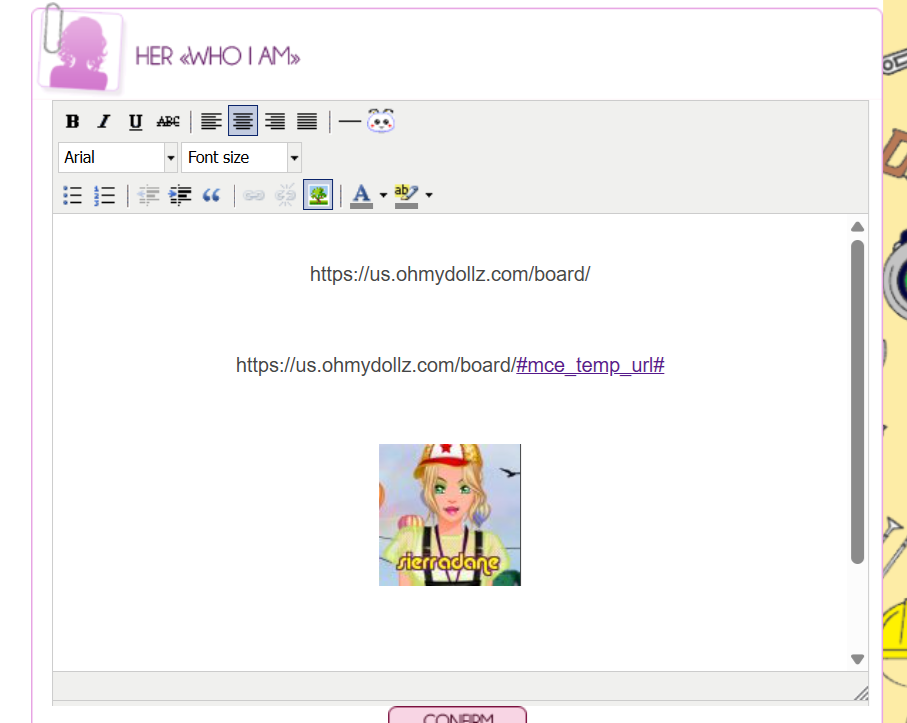
Last edited by sierradane (2026-06-09 23:29:54)
[img]http://us.ohmydollz.com/img/avatar/878.png[/img]
[img]http://i.imgur.com/ONu5iYQ.jpg[/img]
"Well, Jane, it just goes to show you, it's always something — if it ain't one thing, it's another." Roseanne Roseannadanna